
Introduction
Welcome to my Cookie Clicker Clone aka God of the Galaxy. Cookie Clicker is a game about creating an insane amount of cookies simply by clicking. The more cookies to get the more upgrades you can buy such as cookies per second or 10 more cookies per click. There seems to be no end or task to this game apart from seeing what high score you can achieve ultimately.
Making God of the Galaxy
So initially I wanted to recreate Cookie Clicker but with almost a sci-fi outer world experience. For me I was drawn to the idea of acting as ‘The Hand of God’ so to speak. Being able to take control and be in power of the entire universe. However, it took a darker twist when instead I decided the main goal to be destroying the planets. I thought of this to be a good concept as the universe is technically never ending just like Cookie Clicker.
Artwork
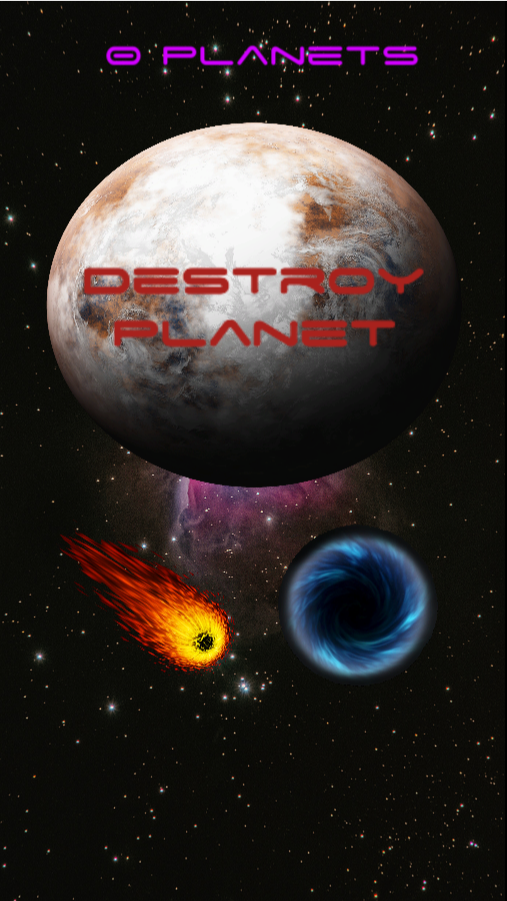
For God of the Galaxy I had to for the first time think about how this game would look being played by someone else. As well as it being visually appealing, you want to be able to understand the game aspects just from the imagery itself.
All the images I used were from the internet and were copyright free images. I tweaked them all individually just a bit in order for it to blend with the background I had chosen and just give it a more visually appealing effect.
Also I tried to implement a feature that would make the planet turn red if it was hovered over but I couldn’t get it to work every time but in future it would be handy to get to learn to be able to changer the colour every time rather than first time only. Other than that it should turn red when clicked to resemble a planet being destroyed.
Obviously with the main aim of the game being destroying planets I tried to think of natural events that could occur in but essentially be ‘GOD’.
Scripting
This game was my very first experience into scripting and safe to say it was an exciting one! So here it is broken down and explained to the best of my ability;
Clicking Script
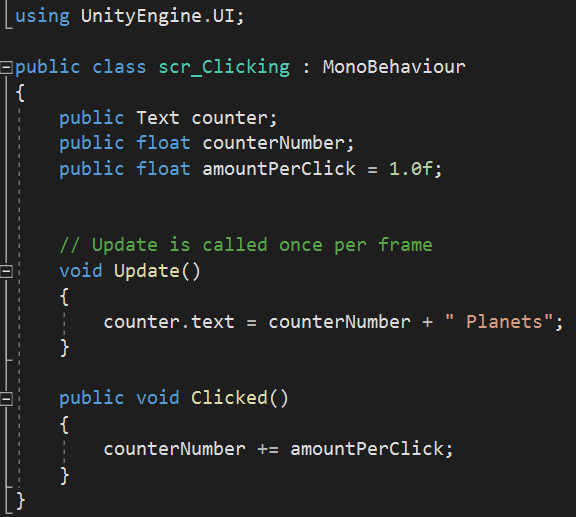
To begin with because I am using Unity UI elements we would need to reference that at the beginning to let Visual Studio know what to look for so we being at the top by saying we are using ‘UnityEngine.UI;’.
So now within the script I needed to place a number of variables which can either be public or private(accessed in Unity or not). I began with referencing the Text element which would be the counter. Next I created a public float for the ‘counterNumber’ which tells me that this will be a number that can have a decimal point (eg. 4.3). Lastly in the variables I added the final variable which was another public float ad this one was ‘amountPerClick’ which I set to a value of 1.0 but with it being public it was a value I could change within Unity if I wanted to.
Now in ‘void Update’ I can tell Unity what I want to do with the variables I placed above. In this I am saying that the counter text is equal to the counter number plus the word ‘Planets’. so for example this would display something like ’45 Planets’.
Lastly I created a public void for the action of the mouse being clicked. Within this I have told Unity to add the amount per click which is set to 1, to the total counter number displayed.
Upgrade Per Click Script
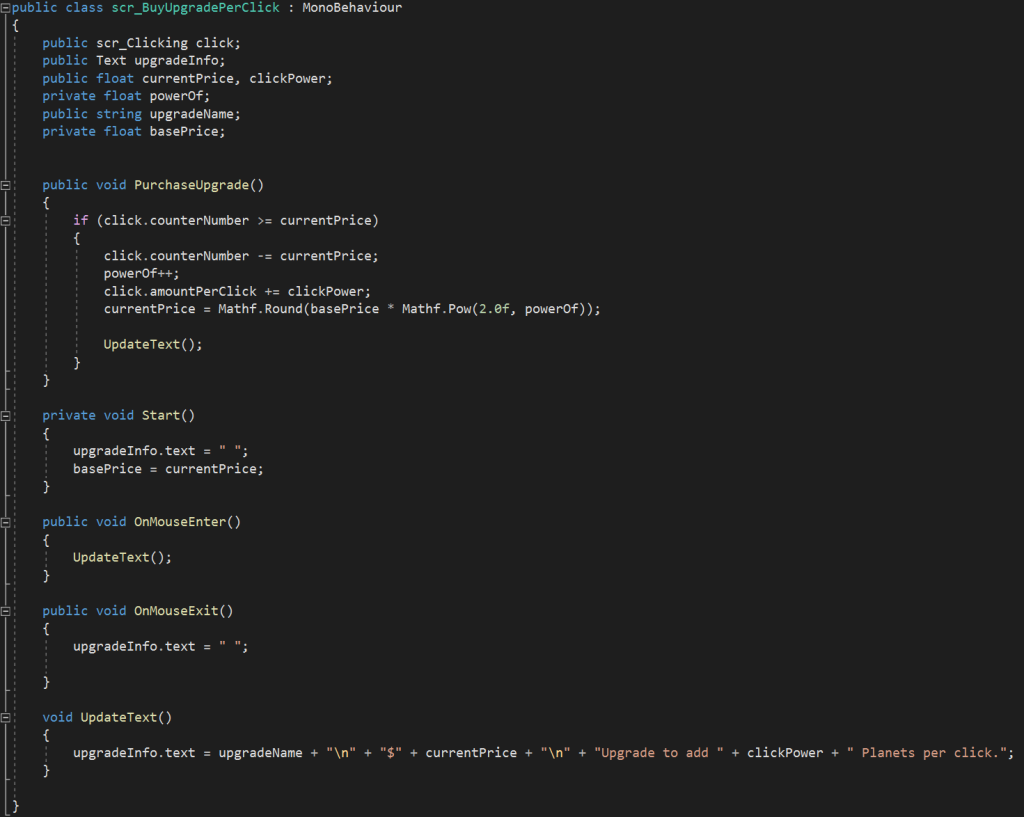
Within this upgrade per click script the aim was to add a value to the counter number if purchased which would also decrease the amount of planets you had. Hovering over the purchase with the cursor would provide with the information about the purchase.
So to start with the game engine would check to see if the number of planets was greater than the purchase cost and if so then that item could be available for the player. However, making the cost the same as the game progresses wouldn’t make it much of a challenge so that’s were I input the ‘Mathf.Pow(2.0f, powerOf);’ so it increases the price every purchase therefor making it more of a challenge and more rewarding to purchase each time!
Within the bottom half of the script we are referring to the mouse cursor actions and what we want the information message to say.
Auto Click Script
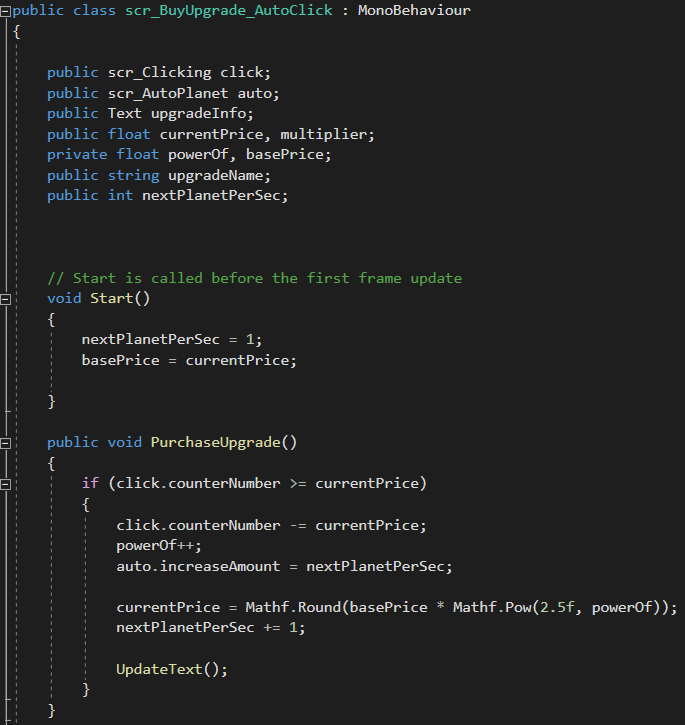
Within the Auto Click script the aim is to be able to add a function which allows the player to automatically destroy a set number of planets for a reduction in the total amount of planets already destroyed. Same as the planets per click script we can apply a ‘powerOf’ to increase the cost price each time purchased therefor making it more challenging!
However, within this element of the game as no click is required to destroy planets after the first purchase I thought to increase the powerOf value so the player may be more inclined to purchase the first option as this will increasingly get a bit more expensive over the duration.
Auto Planet Script
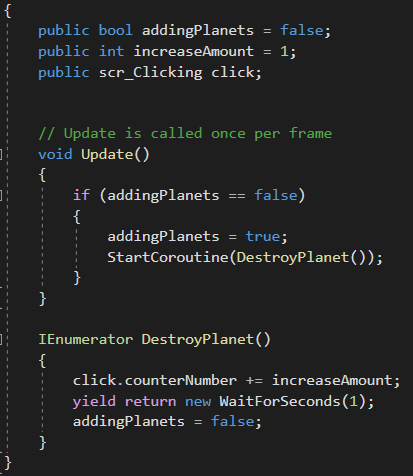
To begin with I referenced another script I was using within Unity making both scripts understand each other. After that this script becomes about auto generating the planets after they have been destroyed by using such functions as ‘coroutine’ and ‘IEnumerator’ which is allowing Unity to create another planet once the one clicked on had been destroyed.
Challenges
Planet doesn’t highlight back to red when cursor moves over planet. Only at the start of the game and after purchases. Overall I don’t think it would take much time to fix this, maybe by using a similar script when the mouse enters the area it could then display a different shade of red rather than staying the original colour.
With it being my first time ever scripting it was a huge learning curve getting used to what will work and what won’t as well as making simple errors in the scripting causing it to not run correctly. Ultimately with a bit of extra time and care these mistakes are avoidable given it can take a while to find the mistake sometimes.
How It Could Progress
Given this was our first game to replicate to some degree I think the main aim at the time was to make it functionable and playable for the user. In the long run to progress this game I could implement more purchase upgrades making the game have a wider variety of choice. I could also add a score system that takes time into account, maybe the longer you play the harder it can be or maybe after so long you may get a ‘Upgrade Deal’ where items can become cheaper if you have enough planets at the time. Lastly, I think some animation would be nice to emphasise the planet being destroyed or these actual events being the Meteors and Black Holes could take place as you upgrade.
Link To God of the Galaxy
https://jacobgalbraith.itch.io/god-of-the-galaxy
Referenced material:
METEORPNG Available online: https://pngimg.com/image/63944. [Accessed 12 Oct. 2021].
Malima Black Hole png. Available online: https://www.cleanpng.com/png-trinidad-black-hole-clip-art-black-hole-700957/. [Accessed 12 Oct. 2021].